Table of contents
- Why Deployments Feel Unreliable
- GitOps — Git as the Source of Truth
- Push Deployment vs Pull Deployment
- What ArgoCD Does
- Why ArgoCD
- End-to-End Workflow
Why Deployments Feel Unreliable
When you operate a Kubernetes cluster long enough, a certain fear creeps in. “Is what’s running in the cluster right now really the same as the manifests in Git?”
Someone might have edited a Deployment directly with kubectl edit, or a CI pipeline might have failed halfway through, leaving things partially applied. If the person who ran the deployment script goes home and an incident breaks out later, just figuring out which version is running becomes a task in itself.
The root cause of this problem is simple. There is no single source of truth tracking the actual cluster state. GitOps is an approach that tackles this problem head-on.
GitOps — Git as the Source of Truth
The core idea of GitOps is surprisingly simple. The manifests in a Git repository are the desired state of the cluster. The cluster should always follow that state, and if it drifts, it should be automatically reverted.
To break this down more concretely:
- Declarative definitions: Infrastructure and application state are stored in Git in a declarative format like YAML
- Single Source of Truth: Since the Git repo is the only reference point, if you want to know what’s deployed in the cluster, just look at Git
- Automatic synchronization: When the Git state and the cluster state differ, an agent automatically reconciles them
- Audit trail: Every change is recorded as a Git commit, naturally documenting who changed what and when
Ultimately, it’s the idea of applying the version control, code review, and rollback capabilities that Git already provides to infrastructure operations as well.
Push Deployment vs Pull Deployment
Traditional CI/CD pipelines operate in a push model.
flowchart LR
    A[Developer] -->|git push| B[CI Server]
    B -->|Build & Test| C[Container Image]
    B -->|kubectl apply| D[K8s Cluster]
After the CI server finishes building, it pushes directly to the cluster using kubectl apply or helm upgrade. This approach is intuitive but has a few problems:
- The CI server needs cluster access credentials (
kubeconfig). This is a significant security burden - If CI dies mid-deployment, the state gets corrupted
- If someone modifies things directly with
kubectl, Git and the cluster drift apart, and there’s no good way to detect it
GitOps uses a pull model.
flowchart LR
    A[Developer] -->|git push| B[Git Repo]
    C[ArgoCD] -->|Watch & Sync| B
    C -->|Apply| D[K8s Cluster]
    C -.-|Runs inside the cluster| D
An agent running inside the cluster periodically watches the Git repo, and when changes are detected, it pulls and applies them on its own. The key difference is that the deployment actor is inside the cluster, not an external CI system.
This eliminates the need to give CI servers cluster access credentials, and since the agent reverts any direct modifications back to the Git state, it prevents drift (state inconsistency).
What ArgoCD Does
ArgoCD is a tool that implements this pull-based GitOps approach in Kubernetes environments. It’s also a CNCF (Cloud Native Computing Foundation) graduated project, which means it’s proven in terms of community size and stability.
ArgoCD’s behavior can be summarized in one sentence: It continuously compares the desired state defined in Git with the live state of the cluster, and synchronizes when there’s a difference.
More specifically, ArgoCD does the following:
- State monitoring: Real-time comparison between the Git repo’s manifests and the cluster’s actual state
- Automatic/manual sync: When a difference is found, it either reconciles automatically or lets the user sync with a single button click
- Health checks: Verifies whether resources like Deployments and Services are healthy and displays their status
- Rollback: Reverting the cluster to a previous Git commit state requires nothing more than a commit hash
- Multi-cluster: A single ArgoCD instance can manage multiple clusters
- Web UI: View per-application status, resource trees, and logs in a browser
The web UI is particularly well-designed, making it easy to see the status of each resource at a glance. Compared to repeatedly running kubectl get from the command line, the operational convenience improves dramatically.
Why ArgoCD
ArgoCD isn’t the only GitOps tool. There’s Flux, Jenkins X, and others. But the reasons teams tend to choose ArgoCD in practice are generally these:
First, the UI is intuitive. It shows relationships between resources as a tree and uses colors to distinguish sync status. Even new team members can quickly grasp the current deployment state.
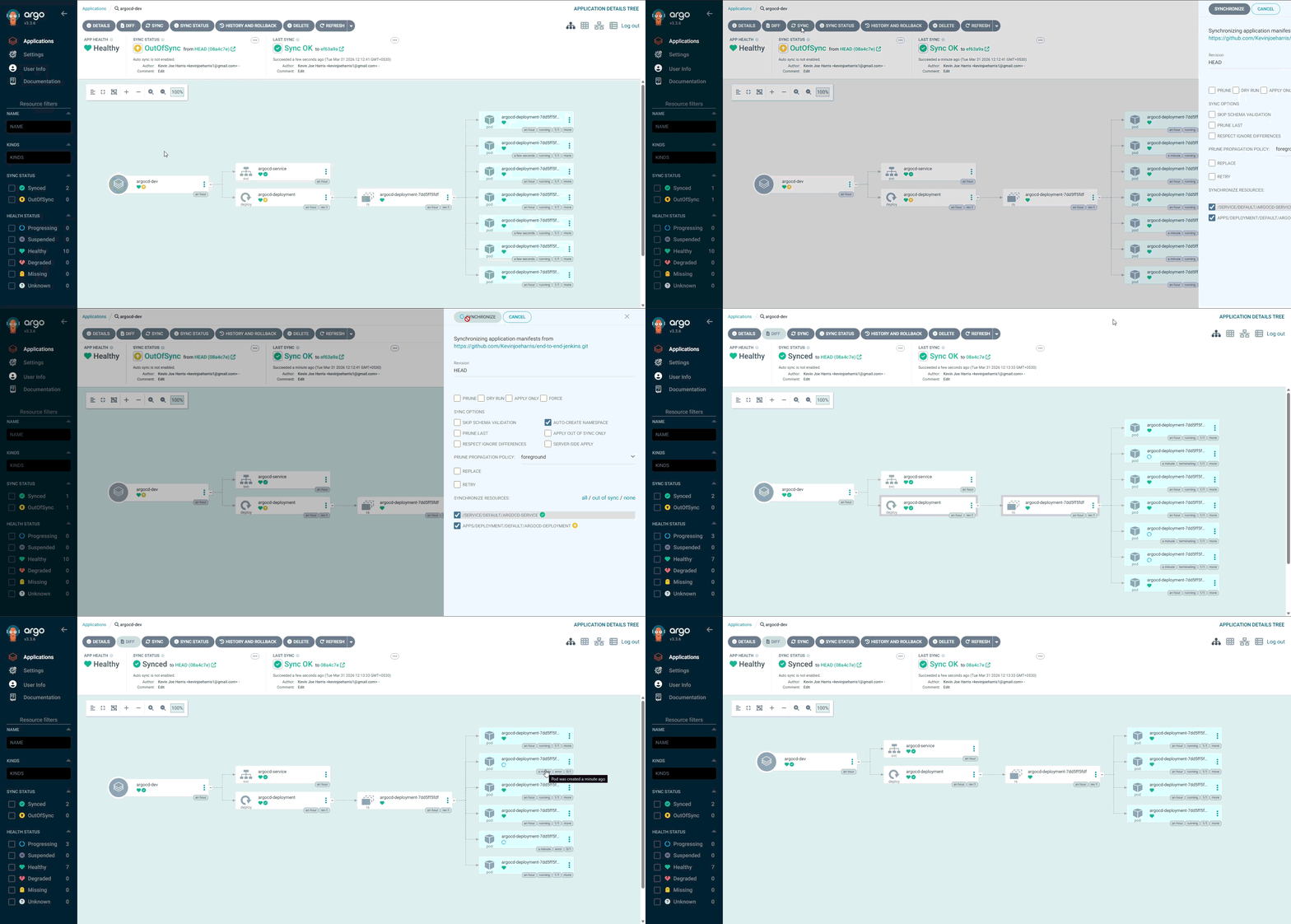 Source: ArgoCD official repository — Apache 2.0 License
Second, declarative management is possible through Application CRDs. Since ArgoCD’s own configuration can also be managed via Git, you get an “ArgoCD managing ArgoCD” setup. This is called the App of Apps pattern.
Third, it supports various manifest tools like Kustomize, Helm, and Jsonnet. Even if each project uses a different tool, you can manage everything through a single ArgoCD instance.
Fourth, RBAC and SSO are supported out of the box. As team size grows, managing who can deploy which apps becomes essential, and ArgoCD provides this natively.
End-to-End Workflow
Let’s outline the typical workflow after adopting ArgoCD.
1. A developer modifies application code and opens a PR
2. CI runs the build & tests and pushes a container image to the registry
3. The image tag in the manifest repo is updated to the new version (manually or automatically)
4. ArgoCD detects the change in the manifest repo
5. It compares the desired state in Git with the live state in the cluster
6. If there's a difference, it syncs the cluster to match the Git state
7. It confirms the deployment is healthy through health checks
The key point here is that CI and CD are completely separated. CI is only responsible for building the image, while the actual deployment is handled by ArgoCD. Since each has a clear role, the pipeline becomes simpler, and it’s easier to track down the cause when problems arise.
In the next part, we’ll install ArgoCD on a Kubernetes cluster, walk through the initial setup, and access the UI.


Loading comments...